Real Accounting, Built In. No Shortcuts, No Workarounds.
Event management software tracks payments. Some tracks expenses. Zenvents360 gives you actual accounting - the kind with a real chart of accounts, a general ledger, and double-entry bookkeeping that balances.
Why event businesses need more than a payment tracker
Collecting payments from clients is one part of running an event business. The other part - the part that determines whether you are actually profitable - is knowing what you are spending, where it is going, and how it maps to the revenue coming in. That requires accounting, not just a transaction list.
The common workaround is a spreadsheet, or a separate QuickBooks subscription, or handing a shoebox of receipts to a bookkeeper once a year and hoping for the best. All of those approaches create gaps - between what your event software knows and what your financial records show. Zenvents360 closes that gap by putting accounting where it belongs: inside the same system where the events happen.
What double-entry bookkeeping actually means
Double-entry bookkeeping is the foundation of every real accounting system, from corner store to Fortune 500. The principle is simple: every transaction affects two accounts - a debit on one side, a credit on the other. Revenue comes in, accounts receivable goes down. You pay an expense, cash goes down and the expense account goes up. Every entry has two sides that must balance.
Why does this matter for an event business? Because it makes your books accurate. Single-entry bookkeeping - just recording income and expenses as a running list - is easy to maintain but easy to get wrong. Double-entry catches errors automatically, because the books only balance when every transaction is recorded correctly on both sides.
It is also what your accountant expects if you ever hand your books off. Building your business on double-entry from day one is not overkill - it is the right foundation.
Chart of accounts and the general ledger
Zenvents360 gives you a full chart of accounts - organized categories for every type of revenue, expense, asset, and liability your business deals with. Income from events, cost of goods, subcontractor payments, equipment expenses, travel costs, software subscriptions - each assigned to the right account category from the start.
The general ledger is the historical record of every transaction that flows through those accounts. Every payment received, every expense logged, every refund issued - it is all there, in order. If you ever need to answer a question about a transaction from eight months ago, the ledger has the answer.
The design mirrors the QuickBooks style that most accountants and bookkeepers already know, which means handing your books off to a professional requires minimal translation. The structure is familiar even if the interface is different.
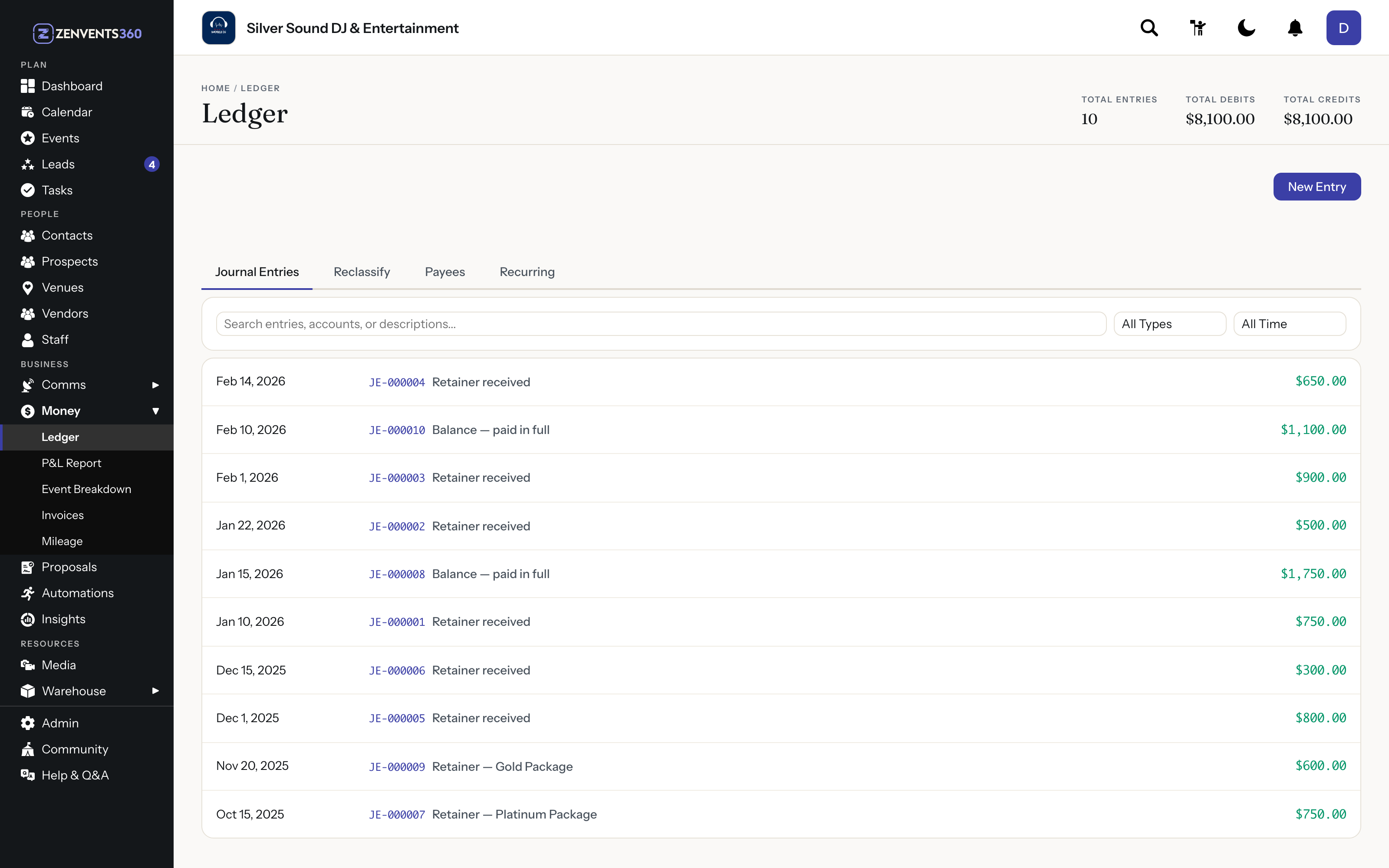
The ledger: every journal entry with its number and amount, and debits matching credits at the top
Profit and Loss reports, on demand
With real accounting data underneath it, Zenvents360 can generate a complete Profit and Loss report at any time - monthly, quarterly, or yearly. The report shows revenue, cost of goods, gross profit, operating expenses, and net income in the standard format any accountant will recognize immediately.
Month-over-month, you can see exactly how the business is trending. Quarter over quarter, you can make informed decisions about pricing, capacity, and spending. Year-end, you hand your accountant a clean, export-ready PDF instead of a pile of unorganized records.
The P&L exports as a landscape-format PDF - properly formatted, totaled, and ready to share. No reformatting, no copying data into another tool, no asking your bookkeeper to guess at what column headings mean.
Who entered what, and when
Every journal entry in Zenvents360 carries its number, its date, and a record of who entered it and when.
For a business where employee access to financial records is a consideration, this matters, and so do the permissions that decide who can touch the books at all. If a question comes up during tax season about a specific entry, you can see who made it. Accuracy you can point to is worth more than accuracy you just assume.
QuickBooks Sync
For businesses that already live in QuickBooks, the direct integration is live. Map each of your accounts to its QuickBooks Online account once, then send journal entries from the General Ledger to QuickBooks with a click.
The built-in accounting system handles everything independently. QuickBooks sync is there for those who want both - not a replacement for what is already there.
Your books deserve better than a spreadsheet
Full accounting is built into Zenvents360, available from day one.
Start Free Trial →Lou Paris
Founder of Zenvents360. 30+ years in the event industry. Built this because someone said he couldn't.